
Accessibility
Overview:
Accessibility and inclusive design are critical aspects of product development. In my experience, both the game development and military simulation industries have historically shown low maturity in this area. Recently, however, many gaming companies have made meaningful progress, embedding accessibility into their culture and requiring it in their products.
Accessibility In Games:
Recognizing a gap in the knowledge and the application of accessibility within the company, I partnered with the DEIA team to create a presentation with three goals:
-
Educate the company on the importance of accessibility and inclusion.
-
Provide DEIA with material to use in their internship program.
-
Empower designers by sharing practical examples of how to integrate accessibility into daily work.
Impact:
What began as my personal curiosity about accessibility grew into a company-wide initiative. The effort raised awareness, sparked action among colleagues, and created sustainable resources for interns, who left with handouts to guide their future work. Designers who adopted these practices began intentionally incorporating accessibility into their workflows, helping shift the culture toward more inclusive product design.
Power Point Presentation:
In exploring accessibility in game development, I identified two prominent approaches: one focused on barriers, and the other on access and challenge. Along the way, I uncovered several misconceptions that needed clarification, as well as clear opportunities for improvement, both “easy wins” with immediate impact and “significant wins” that, with more effort, delivered lasting value.
To address these, I collaborated with the DEIA team to create a PowerPoint presentation. Through multiple rounds of iteration and feedback, we distilled a large body of information into a clear, digestible resource, designed to educate, inspire, and serve as a practical starting point for building accessibility into everyday design work.


Structure:
I broke the content into six clear sections and added questions throughout to spark reflection. Each question challenged the audience to connect accessibility concepts to their own lives, turning the presentation into an active, personal experience.
Example Question:
What situational impairments have you experienced in your life?
Reflect on the need you had and the solution you were able to apply that made it possible for you to play.


Sections:
I included a few sample slides from each section of the presentation.
To ensure the presentation itself was accessible, it was designed to model accessibility as well as explain it. Each section used a dedicated icon and color for easy identification and continuity. Graphics were kept primarily black and white, with color applied only when it added clarity. Text was set in black on white, ensuring high contrast and readability for all viewers.
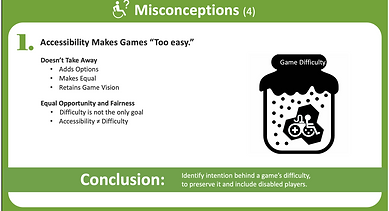
Misconceptions:
Accessibility is surrounded by misconceptions, too many to cover in a single talk. For this presentation, we narrowed in on the ones that mattered most to our audience, choosing examples that would challenge assumptions and spark meaningful reflection.


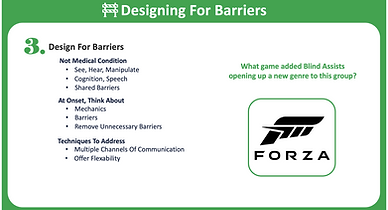
Intro to Barriers:
To set the stage, I began with accessibility fundamentals, tied them to impactful historical events, and framed accessibility through the lens of barriers, helping the audience see both the context and the challenge.


Access & Challenge:
Access and challenge are the twin pillars of accessible design. Without access, players can’t even begin. Without challenge, there’s no sense of growth or accomplishment. When both are present, players can fully engage and experience the game as intended. Many of the principles within this approach also overlap with the barrier model, reinforcing the same core ideas from a different perspective.
We introduced this framework as a valid perspective but kept our focus on the barriers model as the more accessible starting point.


The 5 Barriers:
I introduced accessibility through the five barriers, since it was the clearest entry point when I first began learning. Starting here gave the audience an approachable foundation, allowing them to build confidence before tackling more advanced concepts.
Because there are five defined barriers, this framework makes accessibility easier to grasp, once you know them, it becomes simpler to focus on solving for each one.


Significant Wins:
These represent the five most common accessibility complaints in games. Addressing them delivers the greatest impact for players and provides the best return on effort. Some solutions are more complex or costly to implement, so it’s important to evaluate which will create the most meaningful improvements for your game and its players.


Easy Wins:
These are low-cost, easy-to-implement options that immediately expand access for more players in your target audience. To maximize their value, they should be intentionally planned and integrated into the development roadmap rather than treated as afterthoughts.
Easy wins:
-
Are easy to implement IF thought about early.
-
Cost less IF considered at the beginning of a project.
-
Will increase the number of player who can play your game IF you add them into your game.
-
Gain the gratitude, loyalty and respect from a huge number of players by making this effort towards greater accessibility.


Everyone Wins:
To bring it all together, I highlighted how accessibility benefits everyone—players gain more inclusive experiences, developers reduce support burdens and expand their audience, and the business strengthens its reputation while reaching more customers, resulting in more revenue.